If you are reading this, chances are you have a story to tell. Maybe you want to become a famous TikTok creator, or perhaps you just want to edit your family vacation video so it doesn’t look boring. In 2026, you don’t need an expensive computer to make Hollywood-style videos. Everything you need is right there in your pocket. To use Alight Motion On Mobile , My site is best place for this
But there is one big problem. When you open the Google Play Store or the Apple App Store, you see hundreds of choices. Which one do you pick? Should you pay for one? Is the free one good enough?
Do not worry. I have tested the four biggest names in mobile editing for 2026: KineMaster, CapCut, Adobe Premiere Rush, and Alight Motion. I have looked at their new features, their prices, and their annoying problems.
By the end of this guide, you will know exactly which app is the right tool for you.
The Big Change in 2026: The Rise of the AI Director
Before we look at each app one by one, we need to talk about the elephant in the room. In 2026, editing is not just about cutting and slicing anymore. Artificial Intelligence has completely changed the game .
Think about the old days. You had to watch a whole hour of footage just to find the funny ten seconds. Then you had to figure out where to put the captions. It took forever.
Now, in 2026, the best video editor is the one that does the boring work for you. AI can now remove background noise, add subtitles automatically, and even suggest the best music for your vibe . The apps that do this well are the winners this year.
1. KineMaster: The Professional’s Choice (That Anyone Can Use)
Let’s start with the old reliable. KineMaster has been around for years. While other apps come and go, KineMaster just keeps getting better. In March 2026, they dropped version 8.1, and honestly, it is a huge step up .
What is it good for?
KineMaster is for the user who wants control. If you hate automatic edits and want to decide exactly where every single pixel goes, this is your app. It is powerful enough for YouTubers with millions of subscribers, but simple enough for a 10th grader making a school project.
The New Stuff in 2026 (KineMaster 8.1)
The biggest update this year is all about Text and Captions. In 2026, if your video doesn’t have captions, people will just scroll past it. KineMaster figured this out.
- The New Text Interface: Before, adding text was a pain. Now, when you tap the text tool, a clean menu pops up. You can change the font, color, and animation all in one place without closing your preview screen .
- Word Swap Animation: This is cool. It makes your text appear one word at a time, perfectly synced to music or a voiceover. It looks very professional .
- AI Auto Captions: This is a lifesaver. You speak, and the app writes the words on the screen instantly. It supports multiple languages and even adds emojis if you want .
The Toolbox (Key Features)
- Layers: You can add unlimited layers. This means you can have a video, a picture, a sticker, text, and a handwriting effect all playing at the same time.
- Speed Control: Want to go super slow-mo or fast-forward? You can change the speed with high precision.
- Asset Store: KineMaster has a built-in store with thousands of transitions, stickers, and music tracks. Some are free, some cost money .
The Downsides
- The Watermark: The free version puts a KineMaster watermark on your video. If you are posting professionally, that looks a little amateur.
- Learning Curve: Because it has so many features, it takes about an hour to learn where everything is. It is not hard, but it is not “point and click” simple.
Price Check (2026)
KineMaster works on a subscription model. You can pay monthly or yearly to remove the watermark and unlock all the premium assets .
Verdict: If you want to make gaming videos, vlogs, or professional tutorials, KineMaster is your best friend.
2. CapCut: The Trendy King (Powered by AI)
If you have scrolled through Instagram Reels or TikTok in the last year, you have seen CapCut. It is the app that everyone is talking about. Owned by the same company as TikTok (ByteDance), CapCut knows exactly what the trends are before anyone else.
In 2026, CapCut stopped being just an editor. It became an AI video generator .
What is it good for?
Virality. If you want to chase trends, add crazy effects, and make your video look like it was made by a professional editor in Los Angeles, use CapCut.
The New Stuff in 2026 (Seedance 2.0 & Transitions)
This is where CapCut destroys the competition in 2026.
- Seedance 2.0 (Text-to-Video): This is wild. You can type a sentence like “An astronaut riding a horse on the moon” and CapCut will generate the video clip for you using AI. No camera. No actors. Just typing. It can create clips up to 15 seconds long .
- Next-Gen Transitions: In 2026, transitions are not just fades anymore. CapCut offers Speed Ramp transitions (where the video speeds up and slows down to the beat) and Glitch effects (digital static). These are the effects you see in music videos .
- Beat Sync: The app listens to your music, finds the beats, and automatically cuts your video to match the rhythm. It saves hours of work .
The Toolbox (Key Features)
- Auto Captions: Very fast and very accurate. It supports many languages.
- AI Filters: You can change your face, change the background, or turn yourself into a cartoon character instantly.
- Cloud Storage: You can start editing on your phone and finish on your computer because everything saves to the cloud.
The Downsides
- Privacy: Because it is linked to TikTok, some people worry about data privacy. You have to be okay with their terms of service.
- Overused Effects: Because everyone uses CapCut, sometimes your videos can look like everyone else’s. It is hard to be unique when the same “Trending Template” is used by a million people.
Price Check (2026)
CapCut is mostly free. You can do 90% of the amazing stuff without paying a dime. However, the new AI generation features (Seedance 2.0) and some exclusive fonts now require a Pro subscription .
Verdict: If you are making social media content (TikTok, Reels, Shorts) and you want to work fast, CapCut is the undisputed champion of 2026.
3. Adobe Premiere Rush: The Sad Farewell
I have to be honest with you. This section is a little sad. For many years, Adobe Premiere Rush was the bridge between phone editing and professional computer editing (like Adobe Premiere Pro).
But in 2026, Adobe made a big announcement. Premiere Rush is dying .
What happened?
Adobe announced that as of September 30, 2026, Premiere Rush will no longer work. You cannot download it anymore. They are replacing it with new apps called “Premiere on iPhone” and “Premiere on desktop” .
Should you use it?
No. Unless you already have it installed on your phone from last year, do not download it. It is a dead end.
Why was it good?
Back in the day, Rush was great because it was simple. It didn’t have a million buttons. It just had the basics: cut, color, audio, and motion graphics. Plus, if you had a subscription, you got access to Adobe Fonts and Adobe Stock.
The Current State (2026)
The app is in “maintenance mode.” That means no new features. If your phone updates to a new operating system, Rush might stop working completely .
Verdict: Skip it. It is gone. Look at the other three options instead.
4. Alight Motion: The Animator’s Dream
Now, let’s talk about something different. Alight Motion is not just a video editor. It is a motion design tool. If KineMaster and CapCut are like Swiss Army knives, Alight Motion is a scalpel for surgeons.
What is it good for?
Animation. Do you want to make logo animations, explainer videos, or vector graphics that move? Alight Motion is the best in class. It is the only major app on this list that fully supports vector graphics .
The Features (Why it’s special)
- Vector Graphics: Most apps use pixels (tiny squares). When you zoom in, they get blurry. Alight Motion uses vectors (math formulas). You can zoom in forever, and it stays sharp. This is essential for logos .
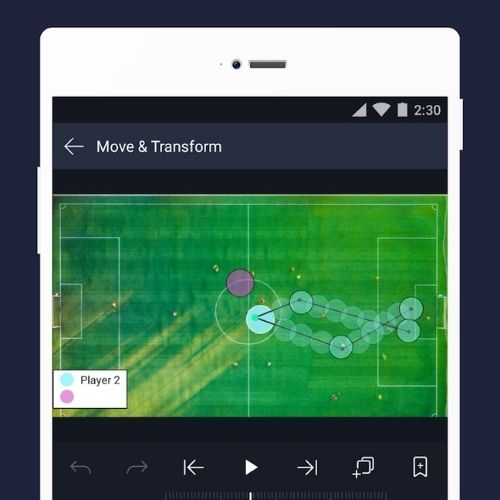
- Keyframe Animation: Every app has this, but Alight Motion does it best. You tell the app “the circle is here at 1 second” and “the circle is here at 3 seconds,” and the app figures out how to move it smoothly in between.
- Over 160 Effects: You can mix and match hundreds of effects to create visuals that no other app can make .
- Parenting & Rigging: This is a fancy term that means you can attach one layer to another. For example, if you animate a character, you can attach the hand to the arm. When the arm moves, the hand follows automatically.
The Downsides
- Not for Standard Vlogs: If you just want to cut two clips of your dog together, do not use Alight Motion. It is too complex for simple tasks.
- The Watermark: The free version leaves a watermark. To remove it and unlock premium effects, you need a membership .
- Steep Learning Curve: This is the hardest app on the list. A 10th grader can learn it, but it requires patience and watching YouTube tutorials. You cannot just guess where the buttons are.
Verdict: If you are a graphic designer, a musician (making lyric videos), or a hobbyist animator, Alight Motion is the only choice.
Head-to-Head Comparison: Which one wins?
To help you decide, here is a simple breakdown of who wins in specific categories.
Easiest to Use
Winner: CapCut
It is designed for scrolling. The interface is huge, bright, and easy to tap. You can make a decent video in 30 seconds.
Most Powerful (Pro Features)
Winner: KineMaster
It has the most granular control over video speed, volume, and blending. It handles 4K 60fps video like a champ .
Best for Animation
Winner: Alight Motion
No contest. The vector support and keyframe curve editor are unmatched on a phone.
Best AI Tools
Winner: CapCut
Seedance 2.0 is a game changer. Being able to generate B-roll footage just by typing a sentence is the future of editing .
Best Value (Free vs. Paid)
Tie: CapCut & KineMaster
CapCut gives you more for free (no watermark usually). KineMaster gives you more power if you pay. It depends on your budget.
The Final Table: 2026 Mobile Video Editors
| Feature | KineMaster | CapCut | Adobe Rush | Alight Motion |
| Best For | Professional Vlogs & Gaming | TikTok & Reels | NOTHING (Dead app) | Animation & Logos |
| AI Features | Auto Captions, Noise Removal | Text-to-Video, Beat Sync | None | No AI (Manual only) |
| Ease of Use | Medium | Easy | N/A | Hard |
| Unique Trick | 4K Export & Layer Control | Seedance 2.0 Video Generation | N/A | Vector Graphics & Rigging |
| Price | Subscription (Watermark free) | Freemium (Pro for AI) | Discontinued | Subscription |
| 2026 Status | ✅ Strong Update | ✅ Trending Strong | ❌ End of Life | ✅ Niche Favorite |
Which one should you download right now?
Stop reading and pick your path.
Pick KineMaster if: You are starting a YouTube channel or a podcast. You need reliability, clear audio tools, and you want to grow into a professional editor without switching apps.
Pick CapCut if: You just want to have fun. You want to use the latest songs, the coolest transitions, and you want to post to social media today. It is the fastest tool for the job.
Pick Alight Motion if: You are an artist. You don’t just want to cut video; you want to draw, animate, and build motion graphics that look like a cartoon network show.
Ignore Adobe Rush. It had a good run, but in 2026, it is time to say goodbye.
The best part about 2026 is that all of these apps (except Rush) are free to try. Download two of them. Play with the AI tools. See which one feels like an extension of your hand.